

Bundle Deal 1
ODROID-H4 / H4+ / H4 Ultra +
Select at least two items. To choose the RAM, NVMe, or Power Supply variants, click on each option to select it or adjust the quantity as needed.
Total
 Thank you for supporting a US-based small business!
Out of Stock!
Couldn't load pickup availability
🎄 Sending this as a gift?
Add gift wrapping to this order for $6.95. Pricing is left out of the package.
Free standard shipping on US orders over $150
Add $150 to your cart to unlock free standard shipping. Use code FREESHIPPING at checkout.
US orders only. Excludes oversized, freight, and bulk orders. Not combinable with other discounts. Expedited shipping not included. CircuitMess items do not count toward free shipping. The FREESHIPPING code must be entered at checkout.
Again, the new generation is more powerful and offers higher performance.
It also delivers key new IO that will please many users.
Used and Open Box units are shipped from KY within 1-3 business days.
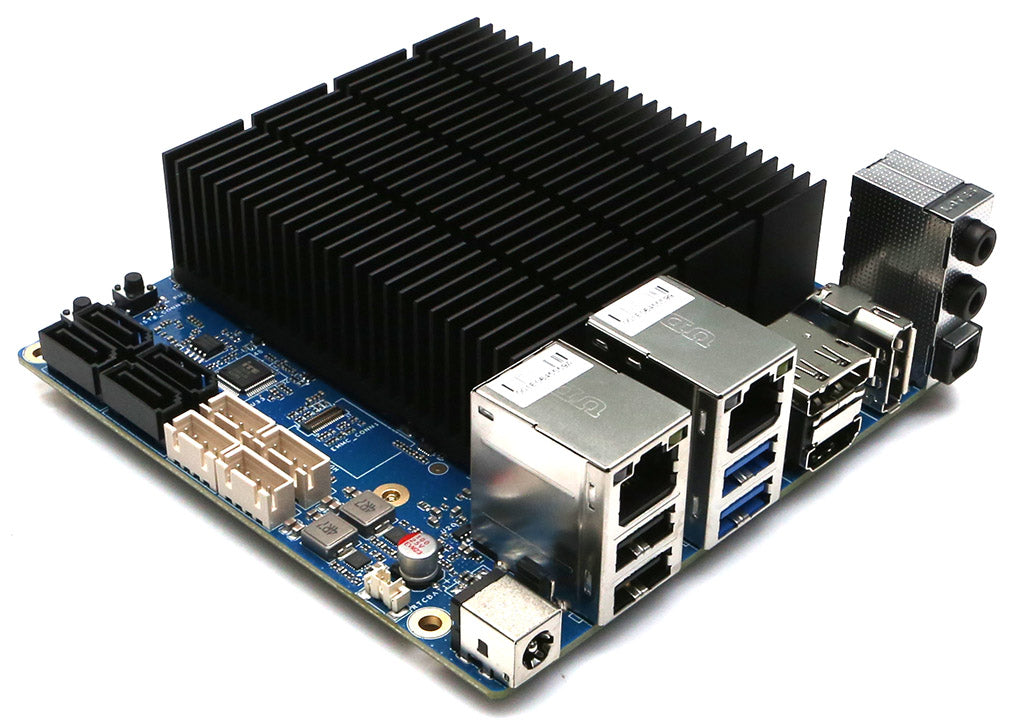
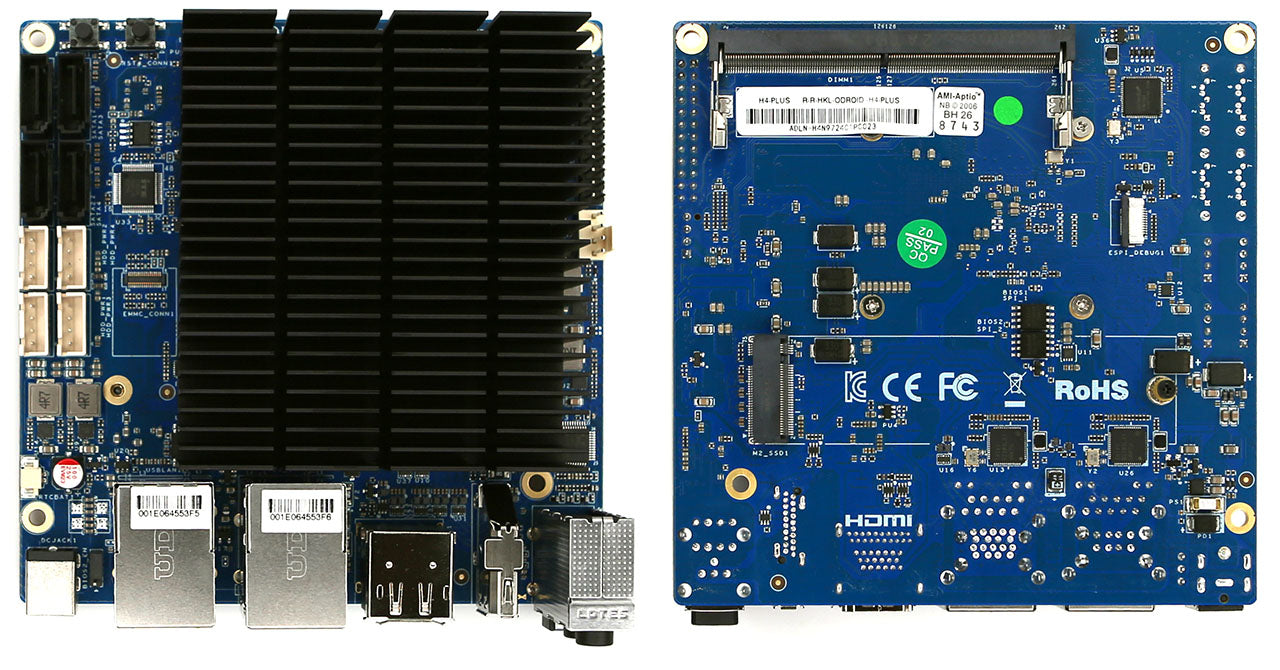
ODROID is introducing the ODROID-H4, H4+ and H4 Ultra, which is equipped with higher performance and richer interfaces (ODROID H4 Series requires a 92x92x15mm Fan for all cases, case Type 4 uses 92x92x25mm but is included with the Type 4 Case.).
KEY FEATURES
REQUIRED ITEMS (NOT INCLUDED)
Form Factor: 120mm x 120mm x 47mm Approx.

The monitor on the left shows the Ubuntu Desktop host OS, the one on the middle shows Windows 11 running as a guest OS, the one on the right shows Debian 13 using the hardware virtualization VT-x technology.

Certain Intel Alder Lake N-series processors, including those used in the ODROID-H4/H4 Plus/H4 Ultra, can experience kernel panics or system crashes under FreeBSD. This issue typically occurs during intensive file operations (e.g., copying large directories) and is related to a known CPU erratum affecting Process Context Identifiers (PCID) in the processor's TLB handling, particularly when using UFS filesystems. ZFS appears unaffected in most cases.
This behavior has been observed across multiple mini-PC platforms with similar processors and persists in recent FreeBSD releases (including 15.0-STABLE). Windows and Linux include built-in mitigations, which is why testing on those OSes may show no issues.
Recommended Workaround:
Add the following line to /boot/loader.conf:
vm.pmap.pcid_enabled="0"
After rebooting, this disables PCID and has resolved the crashes for affected users, resulting in stable operation during extended testing.
Alternatively, updating the CPU microcode (via the cpu-microcode-intel package or equivalent) may help in some cases, though the above tunable is the most consistently reported fix.
For more details, see discussions in the OPNsense forum (applies to FreeBSD-based systems): https://forum.opnsense.org/index.php?topic=48343
We appreciate community feedback on this and are monitoring for any upstream FreeBSD fixes.
Power consumption for the ODROID-H4, H4+, and H4 Ultra was measured using the SmartPower3 tool under specific test conditions. The manufacturer tested with an M.2 NVMe SSD, a 4K HDMI monitor, one 2.5GbE Ethernet connection, and a USB keyboard + mouse combo, running Ubuntu Desktop. Idle power typically ranges from 2-6 watts in this configuration. Actual power consumption will vary depending on the operating system, storage device, connected peripherals, and BIOS settings used.
| Activity | Power Consumption in Watt |
| Ubuntu Desktop Booting | 15.7 |
| Gnome Desktop GUI Idle | 6.2 |
| CPU stress | 20.5 |
| 4K YouTube play on Chrome Browser | 15.4 |
| WebGL aquarium demo on Chrome Browser | 16.4 |
| WebGL + CPU Stress | 21.6 |
| Power Off | 0.2 |
| Sleep (Suspend to RAM) | 1.3 |
|
ODROID
H2+ (‘2020 Jun) |
ODROID
H3 (‘2022 Oct) |
ODROID
H3+ (‘2022 Oct) |
ODROID
H4 (‘2024 Apr) |
ODROID
H4+ (‘2024 Apr) |
ODROID
H4 Ultra (‘2024 Apr) |
|
| Processor | ||||||
| CPU (Intel) | Celeron J4115 | Celeron N5105 | Pentium N6005 | Processor N97 | Processor N97 | Core™ i3 Processor N305 |
| Code name | Gemini Lake | Jasper Lake | Jasper Lake | Alder Lake-N | Alder Lake-N | Alder Lake-N |
| Launch date | Q4’17 | Q1’21 | Q1’21 | Q1’23 | Q1’23 | Q1’23 |
| Microarchitecture | Goldmont Plus | Tremont | Tremont | Gracemont | Gracemont | Gracemont |
| Cores / Threads | 4C4T | 4C4T | 4C4T | 4C4T | 4C4T | 8C8T |
| Cache | 4 MB | 4 MB | 4 MB | 6 MB | 6 MB | 6 MB |
| AVX2 (Advanced Vector Extensions) | No | No | No | Yes | Yes | Yes |
| TDP | 10W | 10W | 10W | 12W | 12W | 15W |
| Single Thread Burst Frequency (GHz) | 2.5 | 2.9 | 3.3 | 3.6 | 3.6 | 3.8 |
| Memory | ||||||
| Max. Memory address space (GB) | 32 | 64 | 64 | 48 | 48 | 48 |
| Max. Memory Speed (MT/s) | DDR4-2400 | DDR4-2933 | DDR4-2933 | DDR5-4800 | DDR5-4800 | DDR5-4800 |
| iGPU (Intel UHD Graphics) | ||||||
| Burst Frequency (MHz) | 750 | 800 | 900 | 1200 | 1200 | 1250 |
| Execution Units | 12 | 24 | 32 | 24 | 24 | 32 |
| Video outputs | ||||||
| HDMI | 1 | 1 | 1 | 1 | 1 | 1 |
| DisplayPort | 1 | 1 | 1 | 2 | 2 | 2 |
| PCIe (via NVMe slot) | ||||||
| Generation | Gen 2 | Gen 3 | Gen 3 | Gen 3 | Gen 3 | Gen 3 |
| Lanes | 4 | 4 | 4 | 4 | 4 | 4 |
|
Compatibility with optional
4-ports 2.5GbE Net Card |
Yes | Yes | Yes | Yes | Yes | Yes |
| IO ports | ||||||
| USB 2.0 | 2 ports | 2 ports | 2 ports | 2 ports | 2 ports | 2 ports |
| USB 3.0 | 2 ports | 2 ports | 2 ports | 2 ports | 2 ports | 2 ports |
| 2.5GbE | 2 ports | 2 ports | 2 ports | 1 port | 2 ports | 2 ports |
| SATA III | 2 ports | 2 ports | 2 ports | No | 4 ports | 4 ports |
| 24pin IO Expansion ports | I2C x 2 | I2C x 2 | I2C x 2 | I2C x 2 | I2C x 2 | I2C x 2 |
| USB 2.0 x 1 | USB 2.0 x 3 | USB 2.0 x 3 | USB 2.0 x 3 | USB 2.0 x 3 | USB 2.0 x 3 | |
| UART x 2 | UART x 1 | UART x 1 | UART x 1 | UART x 1 | UART x 1 | |
| HDMI-CEC x 1 | HDMI-CEC x 1 | HDMI-CEC x 1 | HDMI-CEC x 1 | HDMI-CEC x 1 | HDMI-CEC x 1 | |
| Ext. Power Button x 1 | Ext. Power Button x 1 | Ext. Power Button x 1 | Ext. Power Button x 1 | Ext. Power Button x 1 | Ext. Power Button x 1 | |
| Others | ||||||
| Optional Cooling Fan |
92 mm 5 Volt
mini 4pin connector |
92-25 mm 12 Volt
standard PC 4-pin |
92-25 mm 12 Volt
standard PC 4-pin |
Slim 92-15 or thick 92-25 mm 12 Volt
standard PC 4-pin Slim fan fits inside the new cases. |
Slim 92-15 or thick 92-25 mm 12 Volt
standard PC 4-pin Slim fan fits inside the new cases. |
Slim 92-15 or thick 92-25 mm 12 Volt
standard PC 4-pin Slim fan fits inside the new cases. |
| Dimensions | 110x110mm (4.3×4.3 in) | 110x110mm (4.3×4.3 in) | 110x110mm (4.3×4.3 in) | 120x120mm (4.7×4.7 in) | 120x120mm (4.7×4.7 in) | 120x120mm (4.7×4.7 in) |
| Recommended Power Supply 1 | 60W | 60W | 60W | 60W | 60W | 60W |
|
Recommended Power Supply 2 for supporting booting with 3.5″ hard disks |
133W | 133W | 133W | 133W | 133W | 133W |
| Unlimited Performance Mode | No | Yes | Yes | Yes | Yes | Yes |
| Security (TPM 2.0) | Couldn’t be supported |
fTPM enabled
(Will run Windows 11 out of the box) |
||||
| Hardkernel H-series cases |
DIY assembly
Translucent Blue Acrylic |
DIY assembly
The cases are made of solid and sturdy PCBs. |
DIY assembly
The cases are made of solid and sturdy PCBs. A classic GameCube-style case will be released in May or June separately. |
|||
| Certifications | FCC/CE/KC/RoHS | FCC/CE/KC/RoHS | FCC/CE/KC/RoHS | FCC/CE/KC/RoHS | FCC/CE/KC/RoHS | FCC/CE/KC/RoHS |
Choose any options and quantity, then use Add to cart to add an accessory.
Bundle Deal 1
Select at least two items. To choose the RAM, NVMe, or Power Supply variants, click on each option to select it or adjust the quantity as needed.
Let’s Connect! We’re a small business passionate about helping you achieve your goals of comfort, privacy, and security with Home Assistant, Single Board Computers, and more. Get in touch for a free consultation or just a fun chat about what’s possible—we’ll do our best to guide you in the right direction and get you the best deal! As a small team, we’ll strive to be available or get back to you as soon as possible.
SKU:G0639
View full details