

DietPi v10.8 Released for a Variety of ameriDroid SBCs
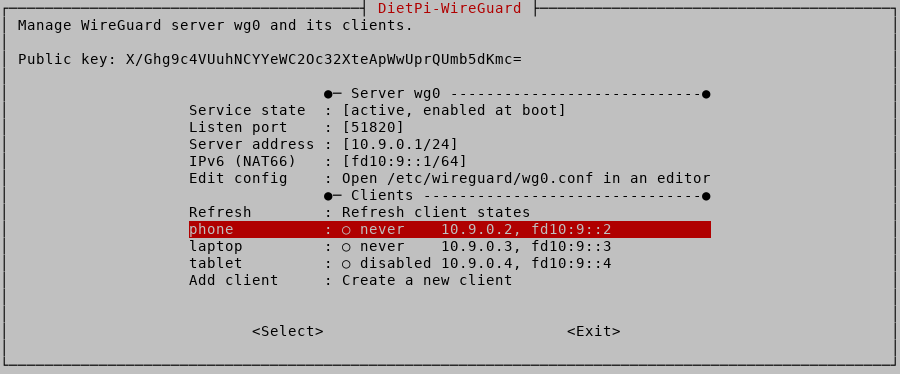 The October 21st, 2026 release of DietPi v10.8 comes with a new dietpi-wireguard tool to manage WireGuard servers and clients, named dietpi-software IDs, DietPi's own HAProxy APT package, several dietpi-network improvements and fixes, and further enhancements. The full release notes are on the DietPi docs.
What is DietPi?
DietPi is a highly optimized, minimal Debian-based Linux distribution built for single board computers. It runs with a low process and memory footprint and a RAM logging setup by default, so it gets the maximum performance out of small hardware. On top of the lean base, it ships a set of lightweight menu tools that do the heavy lifting for you:
- dietpi-software: installs and uninstalls a long list of popular software titles, each pre-configured and optimized for the board, so you are not reading five page guides.
- dietpi-config: customizes hardware and system settings, including network connection and localization, from a menu.
- DietPi-Drive Manager and DietPi-Backup: manage external drives and back up or restore the whole system.
- Logging choices, service control, updates, and automation: pick RAM logging for speed or full disk logging for servers, set CPU affinity and priority for installed services, update without re-flashing, and automate an install by editing dietpi.txt before first boot.
DietPi publishes ready-to-flash images for a large hardware matrix: Raspberry Pi models 1 through 5, ODROID boards from the C2 to the M2, PINE64 and Quartz64, Radxa, Orange Pi, FriendlyELEC NanoPi, RISC-V boards like the VisionFive 2, x86_64 Native PC images for BIOS/UEFI machines, and VMs for Proxmox, VirtualBox, Parallels, UTM, Hyper-V, and VMware. Images default to Debian 13 (Trixie), with Debian 12 (Bookworm) and 14 (Forky) available, and the default login is root / dietpi.
New in v10.8
dietpi-wireguard: your own VPN, from a menu
The headline feature is dietpi-wireguard, a new tool that manages WireGuard servers and their clients via menu or command line. You can create servers and clients, show a client config as a QR code so a phone can connect in seconds, disable, enable, and remove clients, and change client settings plus the server port, address, and IPv6. It works with existing configs in /etc/wireguard, so it also adopts servers that were not installed via dietpi-software. New servers get an IPv6 subnet (NAT66) and IPv6 forwarding, so clients can use IPv6 through the VPN, which did not work with the previous config, and existing servers can turn IPv6 on with one command. The dietpi-software WireGuard option now creates its server config via dietpi-wireguard init, and the entire menu is mirrored by a command line interface for scripting.
Named dietpi-software IDs
Software IDs are now named instead of numeric: nodered instead of 122, derived from the software name in lower case with special characters removed. This applies to the CLI, the search menu, AUTO_SETUP_INSTALL_SOFTWARE_ID in dietpi.txt, /boot/dietpi/.installed, and the DietPi-Survey upload. Input is normalized the same way, so Node-RED is accepted. Numeric IDs are still accepted everywhere, and existing .installed files are migrated automatically, so it doesn't break on an update.
DietPi's own HAProxy package
DietPi now provides its own HAProxy DEB package via its APT server, so a source build on (re)install and the related build dependencies are no longer required, and updates arrive via a normal apt upgrade. The default config is hardened, letting workers run as a dedicated haproxy system user instead of root and applying some sandboxing to the systemd service. The package ships the latest HAProxy release, while Debian's own package lags by several subversions.
Quartz64 optical drives and the rest
Kernel builds for the Quartz64 now support ATAPI/SCSI CD/DVD/Blu-ray drives and the ISO format with common extensions, a nice win for anyone running the Quartz64 as a media box. dietpi-network can now create a static interface configuration without a gateway via CLI, hides virtual interfaces from Docker and other container engines in the host menu, and gained a batch of fixes: duplicate default gateway warnings, WiFi hotspot settings that no longer revert in the menu, hotspot breaks caused by wpa_supplicant, proxy credentials with special characters, and input validation for IP addresses and CIDR prefixes. dietpi-config moves the hostname option to Network Options and adds a time sync timeout setting. On the fix side, UTM appliances for Apple Silicon now use the correct architecture string and VirtIO hardware, HFS+ formatting works again on Debian Trixie, NFS exports with spaces in the path mount correctly, and installs of Immich, Immich-ML, Kubo, Nextcloud, Tor Relay, and UrBackup were repaired.
Boards we sell that run DietPi
DietPi's download page lists official images for most of the boards in our catalog, and v10.8 works on all of them. Here are a sampling.
 ODROID-N2+ : from $94.95 (2GB) / $121.95 (4GB)
The classic DietPi board. Amlogic S922X with quad-core Cortex-A73 at 2.2GHz plus a dual-core A53 cluster, 2GB or 4GB DDR4, Gigabit Ethernet, and an HDMI 2.0 port for 4K@60Hz output. Power draw is about 2.2W idle and 5.9W under full CPU stress, so a 24/7 WireGuard server or media box costs very little to run, and the large passive heatsink keeps it quiet. A Linux Starter Kit for the N2+ is available if you want the board, power supply, and storage bundled. ODROID-N2+

The natural home for the new WireGuard tool. The HC4 is a dual SATA NAS chassis built around the Amlogic S905X3, with 4GB DDR4, Gigabit Ethernet, and a 2.5 or 3.5 inch drive dock. Flash it with DietPi, run dietpi-wireguard to bring up the VPN, then add Samba or NFS from dietpi-software, and you have a complete home file server plus VPN in one box that idles around 6W with spinning drives or less if outfitted with SSDs. ODROID-HC4

The most popular board in the DietPi download matrix has its own dedicated image, with a kernel optimized for the BCM2712 and the new 16k page size. Broadcom BCM2712 quad-core Cortex-A76 at 2.4GHz, 4GB or 8GB LPDDR4X, dual 4Kp60 HDMI, and the RP1 southbridge that doubles USB bandwidth. If you want DietPi's lean footprint on the fastest Raspberry Pi, this is the one. Raspberry Pi 5
 ODROID-M2 : from $299.95 (8GB) / $379.95 (16GB)
Hardkernel's RK3588S2 flagship, and the muscle option for DietPi. Quad-core Cortex-A76 at 2.3GHz plus quad-core A55, 8GB or 16GB LPDDR5, a 6 TOPS NPU, 64GB onboard eMMC, and an M.2 NVMe slot, all in a kit that includes the case and cooling fan. It idles near 1W headless, so it sips power as a 24/7 server, and there is an official DietPi image for the M2 in the download matrix. ODROID-M2

The Quartz64's DietPi kernel builds now support ATAPI/SCSI CD/DVD/Blu-ray drives and the ISO format, which turns the Model B into a capable media box. Rockchip RK3566 quad-core Cortex-A55 at 1.8GHz, 4GB LPDDR4, Gigabit Ethernet with PoE expansion, WiFi 5, USB 3.0, and a miniPCIe slot, for under $90. The QUARTZ64 Model A and the QUARTZ64 Zero ($29.95) are also in our catalog and share the same DietPi images. QUARTZ64 Model B

For when SBC performance is not enough, DietPi's x86_64 Native PC images (BIOS/CSM and UEFI) run on the H5, Hardkernel's 10 GbE network storage board. Intel N300 with eight cores, up to 64GB DDR5, four M.2 slots, and onboard 10 Gigabit Ethernet at about 3W idle. Flash the UEFI Native PC image, add the new WireGuard server, and pair it with the H5 case for a 10 GbE home server that costs pennies to run. ODROID-H5
Getting started
Download the image for your board from the DietPi website, flash it to an SD card or eMMC module, and log in as root with the password dietpi. Run dietpi-software to pick your stack, dietpi-wireguard to stand up the VPN, and dietpi-config to tune the rest. If you are starting from a blank board, the N2+ or HC4 are the best value entry points, the M2 is the ARM power pick, and the H5 is the 10 GbE choice.