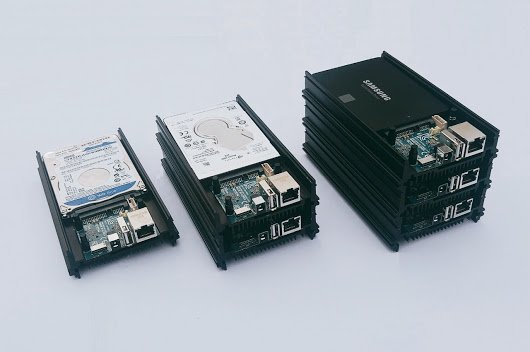


ODROID-HC1
ODROID-HC1
 Thank you for supporting a US-based small business!
Out of Stock!
Couldn't load pickup availability
Free standard shipping on US orders over $150
Add $150 to your cart to unlock free standard shipping.
US orders only. Excludes oversized, freight, and bulk orders. Not combinable with other discounts. Expedited shipping not included. CircuitMess items do not count toward free shipping.
Description ▼
The ODROID-HC1 is an embedded computing device designed to be used as an affordable and flexible solution for network attached storage (NAS). The HC1 allows a centralized file and data server for sharing and streaming multimedia files to all the devices on your network (or even outside your network) like phones, tablets, Smart TVs and TV boxes, laptops and desktops.
The HC1 can easily run Samba, FTP, NFS, SSH, webservers, SQL, Docker, WordPress and other server software smoothly with full Linux distributions like Ubuntu, Debian, Arch and OMV.
Although the ODROID-XU4 board is a powerful ARM board based on Exynos 5422 octa-core processor, many users have troubles because of bad USB cables, and/or poorly designed & badly supported USB to SATA bridge chipsets. Because of this, a new board called ODROID-HC1 (HC = Home Cloud) has been developed based on the ODROID-XU4 design to provide a solution that’s both easier to use and even more affordable, and also includes a metal case and space for a 2.5″ hard drive or solid state drive.
All less-necessary features for this use case have been removed from the original ODROID-XU4 primarily including the HDMI and eMMC connectors, external USB3.0 ports (now utilized internally for SATA and Gigabit Ethernet), power button, and boot selector switch. The specifications for ODROID-HC1 kit are listed below.
Various storage devices have been tested including Seagate Barracuda 2 TB/5 TB HDDs, Samsung 500 GB HDD and 256 GB SSD, Western Digital 500 GB and 1 TB HDD, HGST 1TB HDD with UAS and S.M.A.R.T. functions.
The fun part is that you can easily stack several ODROID-HC1 kits on top of each other, and it should be possible to use Ceph filesystem (Ceph FS) to enable the stacked boards to show as one logical volume.
Links to compliance documentation available at the bottom of this listing.
Additional items required to operate - see "NOT INCLUDED" section below
KEY FEATURES
- Samsung Exynos5422 Cortex™-A15 2Ghz and Cortex™-A7 Octa core CPUs
- 2GB LPDDR3 RAM PoP stacked
- 1 x USB 2.0 Host
- Gigabit Ethernet port
- MicroSD UHS-1 Slot tested to 128GB capacities for boot media
- SATA interface via JMicron JMS578 USB 3.0 to SATA bridge chipset for 2.5in. drive
- Serial UART header (for debugging)
- Integrated metal frame acting as a passive heatsink and hard drive mounting frame (supports 2.5" hard drives up to 15mm thick)
- Operating temperature range: approx. -10C to +45C
- Fully software compatible with ODROID-XU3 and XU3-Lite
- Low cost, small form factor, high performance!
- Linux server OS images based on modern Kernel 4.9 LTS
- PCB Dimensions: 56 x 47 mm (2.20 x 1.85 in. approx. not including heatsink/tray)
- Case Dimensions: 147 x 85 x 29 mm (5.79 x 3.35 x 1.14 in.)
- Weight: 226g
INCLUDES
- ODROID-HC1 Board
- Aluminum Stackable Mounting Frame/Heatsink
REQUIRES
- microSD module to contain the operating system -- or at a minimum, the boot configuration
- Compatible power supply is 5VDC/4A-6A
NOT INCLUDED
- No power supply included - Consider an ODROID 5VDC/2A power supply available on this site
- No microSD or eMMC card included - eMMC memory is much faster than microSD memory
- No case included
- USB-UART module highly recommended for tinkering with u-boot, kernels, multiple installs and more
NOTES
- No HDMI/display port as this is designed as a headless server
- Guaranteed production to the middle of 2020, but production expected to significantly exceed that date
- Power consumption normally in the 1A-2A range, but can approach 4A during heavy computing loads with USB devices attached
- If connecting another HDD externally through the USB port, consider using the 5V/6A power supply
- Supports SSD/HDD thicknesses of 7mm to 15mm
- SATA port supports real-world transfer speeds of approx. 300MB/sec.
LINKS
Official
- ameriDroid Learn - https://ameridroid.com/blogs/ameriblogs/tagged/odroid-hc1
- Wiki - https://wiki.odroid.com/odroid-xu4/odroid-xu4
- Schematics - http://dn.odroid.com/5422/MC1_HC1/Schematics/HC1_MAIN_REV0.1_20170630.pdf
- PCB Mechanical Drawings - http://dn.odroid.com/5422/MC1_HC1/Schematics/HC1_MAIN_REV0_1.DXF
- HC1 FAQ - https://www.hardkernel.com/shop/odroid-hc1-home-cloud-one/
- OS Images - https://wiki.odroid.com/odroid-xu4/os_images/os_images
- How to change the MAC address - https://wiki.odroid.com/odroid-xu4/troubleshooting/change_mac
Community
- Golem.de preview (German) - https://www.golem.de/news/odroid-hc-1-bastelrechner-besser-stapeln-im-nas-1708-129453.html
- CNX Software Preview - http://www.cnx-software.com/2017/08/10/hardkernel-to-launch-stackable-49-odroid-hc1-home-cloud-200-odroid-mc1-cluster-solutions/
- FCC - https://wiki.odroid.com/_media/en/xu4/en/fcc_odroid-xu4.pdf
- CE - https://wiki.odroid.com/_media/en/xu4/en/ce_odroid-xu4_2017.pdf
- RoHS - https://wiki.odroid.com/_media/odroid-xu4/hardware/doc_odroid-xu4_xu4q.pdf
- KCC - https://wiki.odroid.com/_media/en/xu4/en/kcc_odroid-xu4.pdf
Warranty is valid for thirty days, starting upon date of receipt.
Recommended Accessories ▼
Bundle Deals▼
Let’s Connect! We’re a small business passionate about helping you achieve your goals of comfort, privacy, and security with Home Assistant, Single Board Computers, and more. Get in touch for a free consultation or just a fun chat about what’s possible—we’ll do our best to guide you in the right direction and get you the best deal! As a small team, we’ll strive to be available or get back to you as soon as possible.
SKU:G0003-R
View full details