

Zooz Bypass Accessory for Smart Dimmers
Zooz Bypass Accessory for Smart Dimmers
 Thank you for supporting a US-based small business!
In stock
Couldn't load pickup availability
Free standard shipping on US orders over $150
Add $150 to your cart to unlock free standard shipping.
US orders only. Excludes oversized, freight, and bulk orders. Not combinable with other discounts. Expedited shipping not included. CircuitMess items do not count toward free shipping.
Description ▼
KEY FEATURES
- Install the bypass accessory between your smart dimmer and the connected load to reduce flickering for selected LED bulbs
- Pigtail wires included for quick installation
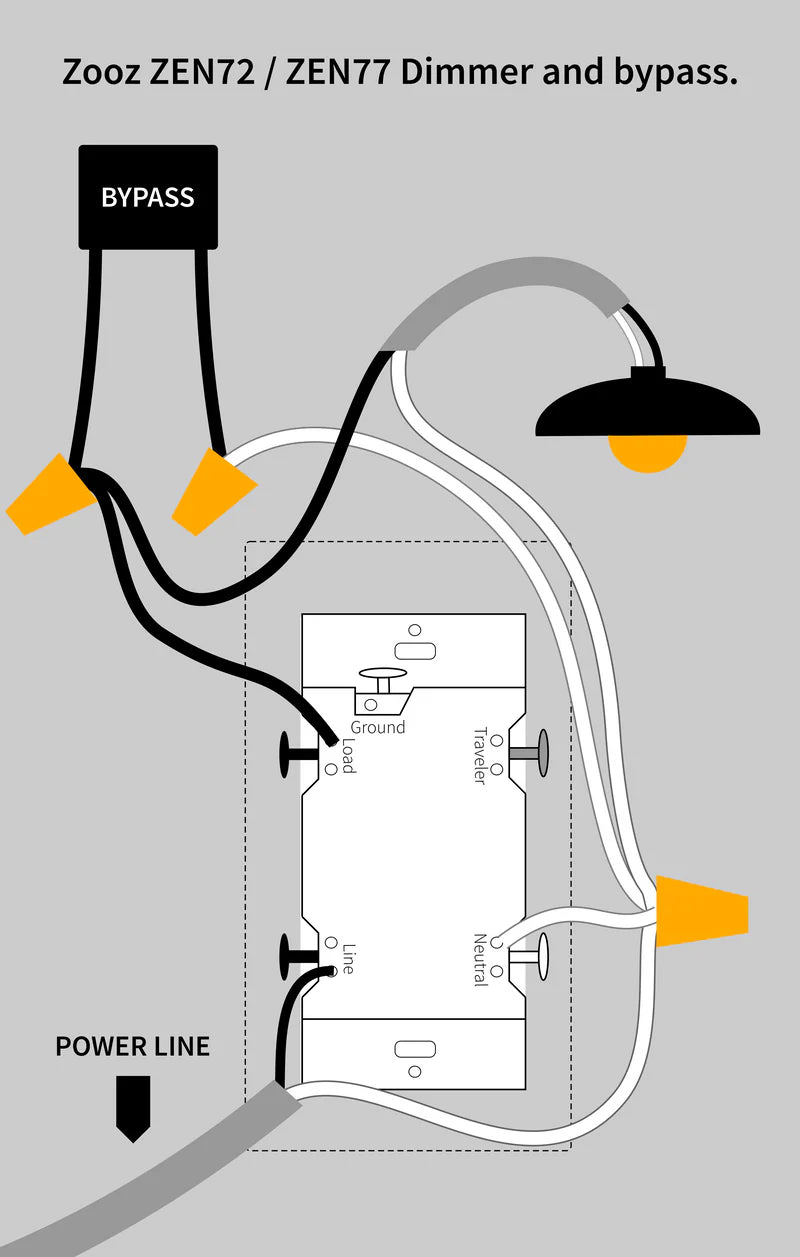
Connect the bypass between the light (load) and your Z-Wave dimmer to eliminate the flickering effect which may occur with incompatible LED drivers.
SPECIFICATIONS
- Power: 100-240V~, 50/60Hz
- Operating Temperature: 32-104° F (0-40° C)
-
Installation and Use: Indoor only
INSTALLATION
NOTE: Always turn the power off at the breaker when handling 120 V installations.
1. Connect the bypass according to the appropriate wiring diagram, making sure that your smart dimmer is already installed according to the instructions and fully functional.
2. Isolate all bare wires and/or terminal screws with electrical tape to minimize risk of accidental electrical short.
3. Carefully arrange the bypass and smart dimmer along with all wires back in the electrical box.
Recommended Accessories ▼
Bundle Deals▼
Let’s Connect! We’re a small business passionate about helping you achieve your goals of comfort, privacy, and security with Home Assistant, Single Board Computers, and more. Get in touch for a free consultation or just a fun chat about what’s possible—we’ll do our best to guide you in the right direction and get you the best deal! As a small team, we’ll strive to be available or get back to you as soon as possible.
SKU:E0881
View full details