
Classic Jag and Ford Dashboards, Modern Android: ODROID Builds for JagDroid and ForDroid
If you own a mid-2000s Jaguar XJ, S-Type, or X-Type — or a Ford with the Denso touchscreen nav, such as a Mk3 Mondeo — you already know the problem. The factory screen still looks right in the dash. Climate, audio, and the original buttons still work. The maps, though, stopped mattering more than a decade ago, and there is no clean way to run Waze, Google Maps, Spotify, or Apple CarPlay without ripping the whole unit out.
That is the problem Ben Willcox set out to solve.
His two projects — JagDroid for Jaguar and ForDroid for Ford — keep the original head unit in the car. Behind the glass, a small single-board computer running Android (today, typically an ODROID-N2+) drives modern apps on the factory display. Press NAV and you are in Android. Press AUDIO, CLIMATE, or TEL and you are back in the original Jaguar or Ford UI.
ameriDroid has sold ODROID boards into these builds for years. This post is a field guide for customers who want to support a JagDroid/ForDroid conversion, upgrade an older C2/C4 install to an N2+, or flash a fresh Android / LineageOS image onto eMMC.

The ODROID-N2+ is the Android computer used in current JagDroid and ForDroid builds. Photo: ameriDroid.
Note: JagDroid Ltd and ForDroid are independent projects run by Ben Willcox (UK). ameriDroid supplies the ODROID hardware and accessories commonly used with those systems. We do not perform the head-unit conversion itself. Always follow Ben’s current documentation and images for anything that plugs into a vehicle.
What JagDroid actually is
JagDroid is an upgrade for the factory Jaguar touchscreen used in:
- Jaguar XJ X350 / X358
- Jaguar S-Type
- Jaguar X-Type
The official site describes the current production build as:
- An ODROID-N2+ running a recent Android image (Ben has published Android 13 images and has referenced Android 15 on the current site)
- 4GB RAM (2GB works for many apps; 4GB is preferred if you add CarPlay dongles or heavier launchers)
- 16GB eMMC as the default system disk, with larger modules available
- USB Wi-Fi, Bluetooth, and GPS
- A replacement higher-resolution LCD with capacitive multi-touch
- Audio injected into the factory CD/MD/cassette path so steering-wheel skip and front-panel CD controls still work
- Optional reverse / front camera inputs and an optional Apple CarPlay / Android Auto USB dongle
The design goal is the opposite of a cheap double-DIN Android radio: no extra buttons in the dash, all original Jaguar functions retained. Press NAV to enter Android. Hold NAV to go back to the original Jaguar nav. Skip tracks from the wheel. Pair the phone to a device named something like JagDroid-N2.
Ben started the work on his own 2004 XJ Super V8 around 2016, documented the reverse-engineering on Jaguar Forum, and later turned the conversion into a paid service with custom PCBs. There is also a cheaper JagDroid-BT path for owners who only want Bluetooth streaming on older XJ / XK cassette or CD units.
Watch the official JagDroid demo (X-Type, S-Type, and XJ X350 / X358):
Source: JagDroid on YouTube
Primary sources
- Official site: jagdroid.org
- About / origin story: jagdroid.org/about-us
- Install guide (N2-era): jagdroid.org/installation-version5-1
- OS flashing: jagdroid.org/odroid-os-image-flashing
- Facebook: facebook.com/jagdroid.org
- Contact used publicly: ben@jagdroid.org
What ForDroid is
ForDroid is the Ford sibling. Ben introduced it as a variation of JagDroid for Fords fitted with the Denso touchscreen navigation system, including the Mk3 Mondeo.
The idea is the same:
- You send the factory Denso head unit.
- He fits an internal board and extra connectors on the back (HDMI in, power out to the Android computer, reverse-camera input).
- An ODROID-N2 family board sits in the car and paints Android onto the factory screen.
- Factory HVAC and audio controls stay factory.
The public home for the project is the Facebook page facebook.com/fordroid.org and the introduction video on the JagDroid YouTube channel. Email listed in that video is also ben@jagdroid.org.
Ford owners on TalkFord and Ford Owners Club often debate ripping the Denso unit out for a generic Android radio. ForDroid is the “keep the Denso, add Android” answer to that thread.
Watch the ForDroid introduction (Denso touchscreen / Mk3 Mondeo):
Source: JagDroid on YouTube · Facebook: fordroid.org
The LineageOS / N2+ flashing note
The third link in this cluster, Odroid N2+ Lineage OS Installation Instructions.docx, is a shared how-to for putting LineageOS on an ODROID-N2+.
That matters for two audiences:
- JagDroid / ForDroid owners who want a newer AOSP-based image than the stock Hardkernel Android 9 Pie build
- Anyone building a bench test system before the converted head unit comes back from the UK
Community LineageOS images for N2 / N2+ / N2L have been maintained on the ODROID forum for several Android generations (including Android 13 and Android 15 builds). Ben has also published his own flashed images and a walkthrough that uses balenaEtcher plus the N2+ USB mass-storage (ums) mode, so you can write the eMMC without pulling it if you prefer.
If you are flashing from a laptop in the US, the practical shopping list is: N2+, matching eMMC, an eMMC writer, and a known-good 12V supply. Those are all stock items at ameriDroid.
Watch: reinstalling Android on the ODROID-N2+
Source: JagDroid on YouTube · Written steps: jagdroid.org flashing guide · Shared LineageOS notes: Odroid N2+ Lineage OS Installation Instructions
Where the community talks about these projects
Official / first-party
| Resource | What it is |
|---|---|
| jagdroid.org | Product, install, flashing, operation guide |
| facebook.com/jagdroid.org | Build photos, image releases, support |
| facebook.com/fordroid.org | ForDroid page |
| YouTube: JagDroid | Official video channel (~2.8K subscribers) |
YouTube videos worth watching
The official JagDroid YouTube channel is the best place to see the system in a real dash. The main demo and ForDroid intro are embedded above. Additional videos you can play here:
2017 origin demo (C2-era conversion):
Upgrade an older C2 JagDroid to ODROID-N2+ (12V retro-fit kit):
Apple CarPlay on X350 / X-Type / S-Type:
Automatically pair Bluetooth when you get in the car:
JagDroid-CD Bluetooth streaming (no full Android computer required):
Forums and owner sites
- Jaguar Forum HOWTO (the original long thread, C2-era BOM included): Android upgrade to Jaguar touchscreen HOWTO
- Follow-on hardware discussion: Jagdroid for X-Type + Odroid C4
- X-Type.uk project write-up: xtype.uk/projects/6/jagdroid-android-upgrade
- Custom boot logos and 800x480 wallpapers: xtype.uk/jagdroid
- Jaguar Owners Club thread: JAGDROID — Jaguar S-Type Club
- ODROID forum LineageOS 22.1 / Android 15 for N2/N2L: forum.odroid.com thread 49491
- A user describing Ben’s key mapping (NAV to F10, voice to F8) on a LineageOS thread: forum.odroid.com thread 44124
Installer / reseller mentions also show up at oldjaguar.com for owners who want a shop to handle the dash work.
How the hardware stack fits together
A finished JagDroid or ForDroid car is really three layers:
- The converted head unit — Ben’s PCBs, Arduino / video switcher, new LCD, extra HDMI and 12V leads on the back. This part is not an ameriDroid product.
- The Android computer — almost always an ODROID-N2+ today. Earlier DIY and conversion units used ODROID-C2 (5V) and later ODROID-C4 (12V). N2+ is a plug-and-play HDMI + USB box once the head unit has a 12V DC output.
- The USB periphery — GPS puck, Wi-Fi / Bluetooth, sometimes a powered USB hub, optional CarPlay dongle, optional USB sound path on some C4 DIY builds.
The N2+ lives under the passenger footwell or above the ECU box under the glovebox. HDMI runs to the head unit. Power comes from the converted unit’s 12V jack. USB devices hang off the N2+ or a short hub.
That is why customers keep coming back for boards, eMMC modules, writers, and 12V bricks even after the screen has already been converted.
What to buy at ameriDroid
Prices below are list prices at the time of writing and change. Check the live product page before you order.
1. The computer: start with ODROID-N2+
ODROID-N2+ — from $94.95

ODROID-N2+ — current JagDroid / ForDroid computer. Fan is optional; the stock heatsink is included.
This is the board JagDroid currently ships and the board ForDroid is built around.
Why it won this application:
- Amlogic S922X, four Cortex-A73 + two Cortex-A53, Mali-G52
- 2GB or 4GB DDR4 — get 4GB if you can
- HDMI 2.0 for the factory screen
- Four USB 3.0 ports for GPS, Wi-Fi/BT, hub, CarPlay dongle
- Wide DC input (the N2+ is happiest on a clean 12V barrel jack, which matches the later JagDroid wiring)
- eMMC socket plus microSD
- Stock metal heatsink — important in a closed footwell
- Mature Android and LineageOS image support
2GB vs 4GB: Ben has said 2GB is fine for most nav + music use. CarPlay dongles and heavier launchers (Car Launcher Pro and friends) are happier on 4GB.
If you need a smaller footprint: the ODROID-N2L (from $69.95 when in stock) is the same S922X family in a 69x56mm board. It drops onboard Ethernet and some ports, which is acceptable in a car that already uses USB Wi-Fi. Confirm image compatibility with the JagDroid / LineageOS build you plan to run before you substitute it.

ODROID-N2L — same S922X family in a smaller footprint.
If you are maintaining an older install:
- ODROID-C4 — from $69.95. 12V, HDMI, four USB 3.0. Used in later DIY JagDroid builds and in for-sale converted units on Jaguar Forum.
- Original C2 units were 5V. Do not feed a C2 from an N2-era 12V lead. Ben’s retro-fit kit exists specifically because of that power change.

ODROID-C4 — common 12V board in later DIY JagDroid installs.
2. Storage: eMMC is the system disk
JagDroid’s default is 16GB eMMC, with 64GB offered as an upgrade. eMMC is the right call in a car: faster than microSD, more vibration-tolerant, and the OS images are built for it.

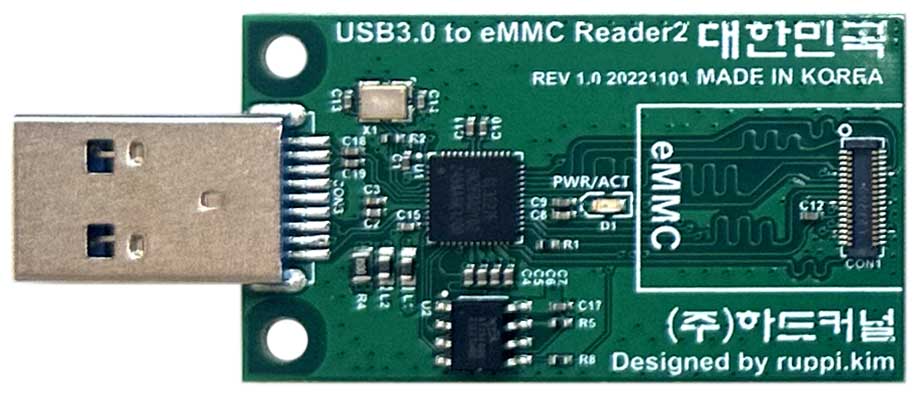
Left: N2 Android eMMC (Green Dot). Right: USB 3.0 eMMC writer for flashing Ben’s images or LineageOS.
| Item | Why you want it | Link |
|---|---|---|
| eMMC Module N2 Android (Green Dot) | Stock Hardkernel Android starting point, 16 / 32 / 64 / 128GB | Android eMMC (Green Dot) |
| eMMC Module N2 Linux (Red Dot) | Same hardware, Linux image — useful if you will immediately reflash LineageOS / Ben’s image | Linux eMMC (Red Dot) |
| eMMC Adapter ($5.95) | Lets a microSD reader see the module | Storage collection |
| USB 3.0 eMMC Module Writer 2 ($12.95) | Fastest way to flash Ben’s image or LineageOS from a laptop | USB 3.0 eMMC writer |
| USB 2.0 eMMC Module Writer ($11.95) | Backup option | Storage collection |
| High-endurance microSD | Extra media storage, not the OS disk | Storage collection |
Size guidance:
- 16GB — matches Ben’s default image. Tight once you add maps offline, Car Launcher, Spotify cache.
- 64GB — the upgrade most owners should buy if they are flashing their own board.
- 128GB — if you keep a local music library on the board instead of streaming.
We can often reflash a module to a blank or customer-specified image before it leaves ameriDroid's warehouse. Mention JagDroid / LineageOS in the order notes if you want us to leave it unconfigured rather than Linux-preloaded.
3. Power, case, and cooling
In the car, the converted head unit usually feeds the N2+ 12V directly. You still want a bench supply.
- 12V/2A US Power Supply — $6.95. Correct barrel for N2 / N2+ / C4. Use this on the workbench.
- 15V/4A Power Supply — $13.95 if you want more headroom with accessories.
- Stock N2+ heatsink is included with the board. An 80mm fan is optional for a sealed footwell in a hot climate; we stock quiet 80x80 fans in the accessory aisle.
- Plastic N2+ cases, Industrial Aluminum Cases, and the larger N2 Cube Case exist if you want the board enclosed on the bench. In the car, most installs tuck the bare heatsink-equipped board.
C2-era 5V USB power cables are the wrong part for an N2+. If you are upgrading a 2017–2019 JagDroid, read Ben’s retro-fit video before you order power parts.
4. Wireless, GPS, and USB odds and ends
The N2+ has no onboard Wi-Fi or Bluetooth. JagDroid adds them on USB, which is exactly how Hardkernel designed the board.

WiFi Module 5BK — dual-band Wi-Fi plus Bluetooth on one USB stick.
- WiFi Module 5BK — $11.95. Dual-band 802.11ac + Bluetooth 4.2 on one stick. Works with Android and Linux on ODROID. This is the module we put in N2+ kits and the closest match to “one dongle that does phone hotspot + Bluetooth audio.”
- A dedicated USB GPS receiver (u-blox-based pucks are what the community uses). Keep it on its own USB port; do not hide it in a cheap unpowered hub with the Wi-Fi stick if you can avoid it.
- A short powered USB 3 hub if you also hang a CarPlay dongle, USB stick, and the JagDroid control cables off the same board.
- A right-angle HDMI lead long enough to reach from footwell to head unit. The N2+ outputs HDMI 2.0; the converted screen is 800x480, so any solid HDMI cable works — strain relief matters more than 4K rating.
- RTC: the N2+ has a CR2032 holder. A $1.45 CR2032 keeps time across battery disconnects, which matters when the car sits.
5. Suggested carts
Cart A — “I am sending my screen to Ben, and I want a spare / bench N2+.”
- ODROID-N2+ 4GB
- 64GB eMMC (Android green-dot or blank)
- USB 3.0 eMMC writer
- 12V/2A US Power Supply
-
WiFi Module 5BK
- CR2032
Cart B — “My C2 JagDroid still works and I want the N2+ speed bump.”
- ODROID-N2+ 4GB
- 16GB or 64GB eMMC
- USB 3.0 eMMC writer
- Confirm with Ben that your particular conversion already has the 12V DC output. If it does not, you need his retro-fit kit, not just a new board.
Cart C — “I only need Bluetooth in an older Jaguar radio.”
That is JagDroid-BT, which is a conversion of the cassette/CD unit itself. You do not need an N2+. Skip the SBC cart and talk to Ben.
Cart D — “I want to experiment with LineageOS on N2+ before I commit the car.”
- ODROID-N2+ 4GB
- 64GB eMMC
- USB 3.0 eMMC writer
-
12V/2A US Power Supply
- HDMI monitor + USB keyboard on the bench
- Follow the shared LineageOS instructions and the ODROID forum Android 15 thread
Software notes for customers flashing their own board
A few things we tell people when they order this hardware for a car:
- Use eMMC, not microSD, for the Android system. microSD is fine for music.
- Match the image to the eMMC size. Ben publishes separate 16GB and 64GB images. LineageOS self-install images are sized the same way.
- balenaEtcher is what both Ben’s flashing page and our own eMMC flashing guide assume.
- You can write the module on a writer, or boot the N2+ to U-Boot and run
ums /dev/mmcblk0so the board pretends to be a USB disk. Ben’s YouTube video walks through that second path. - After a fresh flash you will reinstall apps. Common stack in this community: Car Launcher Pro (or Agama), a landscape-lock app, Waze / Google Maps / TomTom, Spotify or Apple Music, and Tasker if you want the phone hotspot to come up when the car starts.
- Set the N2+ display mode to 800x480@60Hz. That is the panel these conversions use.
- Rename Bluetooth to something you will recognize (JagDroid-N2 is the convention).
- Google Play is not always preinstalled on community images. Hardkernel / Ben workflows often drop an OpenGApps package next to the image and install it from ODROID Settings → Update.
We have a longer eMMC how-to on the blog if you have never flashed one: Writing an image to your eMMC Module.
What this is not
A few boundaries so nobody buys the wrong thing:
- This is not a double-DIN Android radio and not a Raspberry Pi touchscreen bolted over the vents. The whole point is the factory Jaguar / Ford fascia.
- ameriDroid does not modify Denso or Jaguar head units. The soldering, LCD swap, and button-matrix work is Ben’s service (or a documented DIY path for people who already know their way around a soldering iron).
- A generic Android image on an N2+ will boot. It will not magically talk to Jaguar climate buttons until the converted head unit is in the middle.
- Power, fusing, and camera wiring in a 12V vehicle are the installer’s responsibility. Use an ignition-switched feed the way the official install guide describes, and give the board a clean ground.
Why ODROID, and why buy it here
JagDroid did not pick ODROID at random. The C2 was one of the first affordable ARM boards with a usable Android image, HDMI, and enough USB. The C4 kept the 12V input. The N2+ added the big.LITTLE A73 cluster and a heatsink that can sit in a footwell without a fan most of the year. LineageOS maintainers on the ODROID forum have kept that platform current in a way most hobby boards never see.
ameriDroid has been the US ODROID distributor since 2014. If you are a North American JagDroid or ForDroid owner, that means:
- N2+ boards, green-dot Android eMMC, and eMMC writers in one package
- Domestic shipping instead of a second international package on top of the UK conversion
- Someone who already flashes eMMC modules every day if you want a module imaged before it ships
If you are putting a cart together and you are not sure whether you need 2GB or 4GB, 16GB or 64GB, or C4 versus N2+, contact us and tell us which car and which JagDroid / ForDroid generation you have. We would rather send the right board once.
Quick link list
Projects
- JagDroid: https://www.jagdroid.org/
- ForDroid: https://www.facebook.com/fordroid.org/
- LineageOS Guide: https://nc.respectech.us/s/jWQ6eZsY8NF3W8A
Hardware at ameriDroid
- https://ameridroid.com/products/odroid-n2-plus
- https://ameridroid.com/products/odroid-c4
- https://ameridroid.com/products/odroid-n2l
- https://ameridroid.com/collections/storage-emmc-and-microsd
- https://ameridroid.com/products/wifi-module-5bk
- https://ameridroid.com/products/12v-2a-us-power-supply
Community